FeaturePublished 5 min read
How to protect your Telegram bot's content from copying
Telegram lets a bot send protected messages that can't be forwarded or saved. On LibertyBot, the Flow protection button turns that on for every bot in the flow, and Temporary media removes the video from the chat after the time you choose. Neither one stops someone from photographing the screen with another device.
 By LibertyBot TeamLibertyBot Blog
How your bot's content leaks
Anyone can send /start to your bot. Without protection, they save the preview videos, copy the offer text and build a bot just like yours. And buyers can forward what they got to an open group.
You can't lock everything down. What you can do is remove the easy path: the forward and save buttons. That's what Telegram itself offers, and it's what LibertyBot turns on in your bots with one button.
What Telegram itself offers
There are two locks, one for each place:
| Where | Who turns it on | What it blocks |
|---|---|---|
| Group or channel | The owner, in the group or channel info, under Group Type / Channel Type > Restrict saving content | Forwarding messages. According to Telegram, it also prevents screenshots and limits saving media from posts |
| Chat with the bot | The bot itself, on every message it sends (the Bot API's protect_content field) | Forwarding, saving and copying that message |
The group and channel lock came out on December 7, 2021, on the Telegram blog (opens in a new tab); the button's name may change between app versions. The bot lock is in the Bot API (opens in a new tab): protect_content “protects the contents of the sent message from forwarding and saving”. It works message by message, and the bot has to mark each send. In the API documentation (opens in a new tab), Telegram tells apps to block forwarding, downloading and copying on those messages.
How to turn on Flow protection
On LibertyBot, protection is a button in the flow. When it's on, it marks the messages of every bot in that flow as protected: in Telegram, the app removes the options to save and forward media and to copy text.
Open the flow
In the dashboard, go to My Flows and open the flow of the bots you want to protect.
Tap Flow protection
The button is at the top of the editor, with a shield, next to Brazil and Global. When it's on, it's highlighted.
No need to publish
The choice saves right away. Within 30 seconds, the bots' messages go out protected.
Test with a new message
From your own Telegram, send /start to a bot in the flow and try to forward or save a media file. Whatever the bot sent before you turned it on stays as it went out.
What goes out protected
- The funnel's messages and media, from languages to categories.
- The media and texts in Payments, except the payment message itself and the Plan Confirmation.
- Upsell, Downsell, Order Bump, Packs, Remarketing and expiry reminders.
- The text and media of the deliverable the buyer gets in the bot (with a temporary or round video, the text that goes below it is sent without protection).
What stays unprotected on purpose
- The payment message. A buyer who can't copy the payment code or address can't pay, in any currency. The lock works per message: the message with the code to copy or the copy button goes out fully unprotected, and so does the QR code photo. In Brazil, with PIX code in the same message turned off, the text of the Pix charge (Pix is Brazil's instant payment) goes in its own message and stays protected.
- The delivery link and access code. The person needs to open one and copy the other to use what they bought.
What protection doesn't do
- It doesn't stop a photo of the screen taken with another device. The Telegram FAQ (opens in a new tab) itself points out that nobody can stop someone from photographing their screen with another device.
- It doesn't block when the check fails. If the system can't read the flow's setting at the moment of sending, the message goes out without protection. That's on purpose: a protection failure never breaks a sale.
- It only works in Telegram. In the Virtual Bot, which opens in the browser, it changes nothing.
Temporary media: the video disappears from the chat
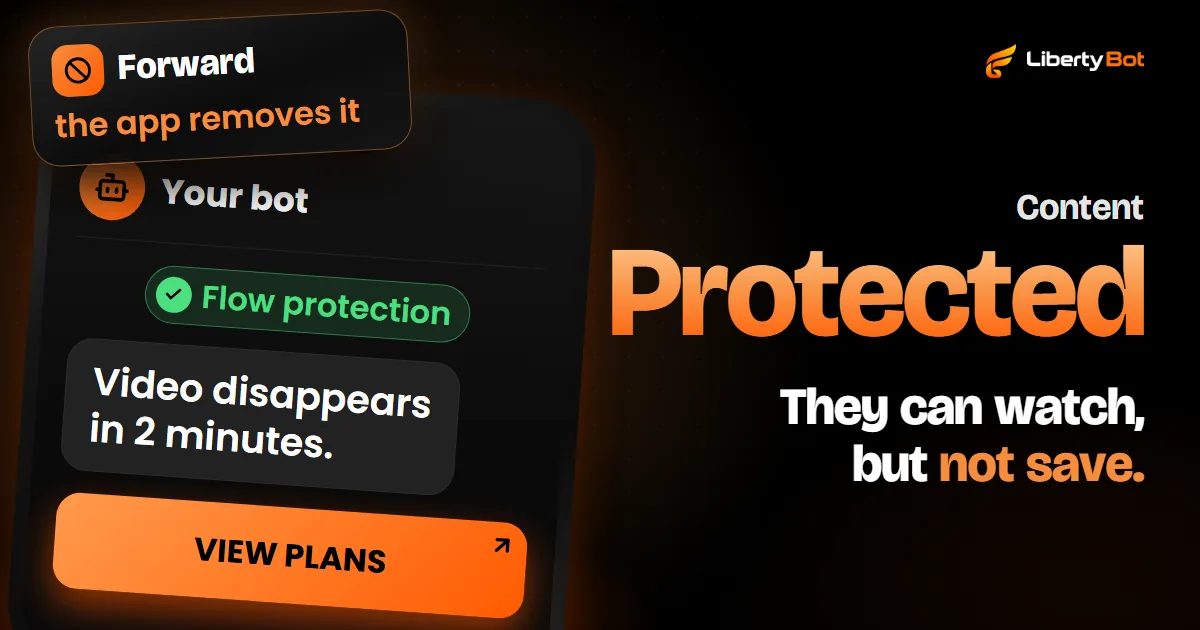
Protection stops saving. Temporary media removes the video from the chat after a while. Together, someone who only came to copy watches, can't keep it and, once the time is up, can't find the video anymore.
- In funnel videos: in the video's box, check Temporary media and choose the time under Disappears after, in seconds, minutes or hours. The field starts at 1 minute.
- The text stays: the temporary video goes out alone, and the text and buttons come right below it, in their own message. When the video disappears, the plans stay in the chat.
- In Payments: on each image or video, the stopwatch button (Time to delete) opens Delete the media after, with preset times (10 s, 30 s, 1 min and 5 min), never or a time of your own. Only the media disappears; the message with the payment code stays.
- From 5 seconds to 24 hours: that's the accepted range. In Payments, a time outside it leaves the media undeleted. In the funnel, the screen warns you and doesn't save a time outside the range: the last valid time stays in effect. The ceiling has a reason: according to the Bot API (opens in a new tab), a bot can only delete a message sent less than 48 hours ago. If the deletion can't be scheduled, the media stays in the chat.
An example: a preview video with the plans right below it, Flow protection turned on and Temporary media set to 2 minutes. Whoever sends /start watches, can't forward or save it, and two minutes later the video leaves the chat. The plans stay.
Want LibertyBot on your bots?
Joining the platform is by invitation: the button below puts you on the waiting list.
Free account. 5% per card sale, R$0.50 per crypto or Stars sale.
Frequently asked questions
Can I stop 100 percent of copying of my bot's content?
No. Protection removes forwarding and saving, and temporary media removes the video from the chat, but a photo of the screen taken with another device always gets through. See what protection doesn't do.
Do I need to turn on protection in each bot?
No. The button is in the flow and applies to every bot connected to it. If your bots use different flows, turn the button on in each flow.
Does protection cover the content of the VIP group?
No. It covers the messages the bot sends in the chat. In the group or channel, turn on Restrict saving content in its settings, as in the VIP group guide. With the VIP Group/Channel delivery, the invite the bot sends has one spot and is valid for 24 hours, but it can be passed on before its first use: see why one link per purchase helps.
Sources (checked on )
- Telegram Bot API: sendMessage and the protect_content field (opens in a new tab)
- Telegram API: Content protection (opens in a new tab)
- Telegram Bot API: deleteMessage and the 48-hour window (opens in a new tab)
- Telegram blog: Protected Content in groups and channels (December 7, 2021) (opens in a new tab)
- Telegram FAQ: screenshots (opens in a new tab)